
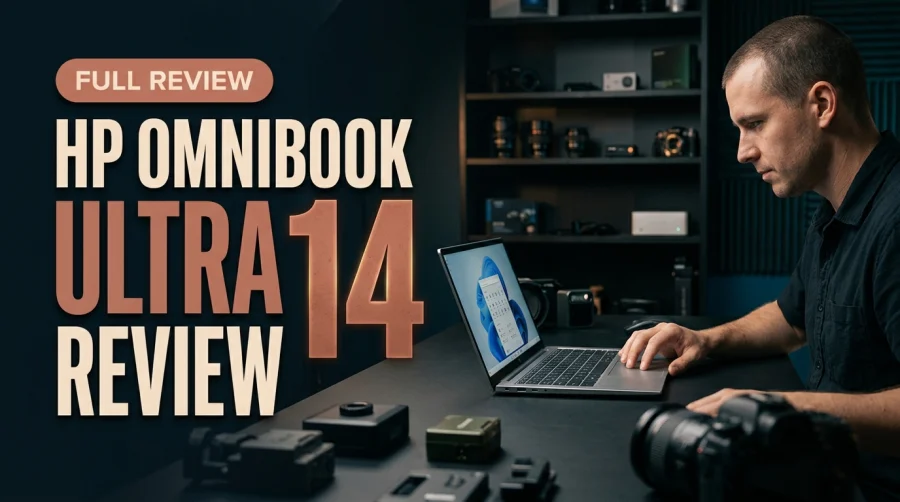
The HP OmniBook Ultra 14 stands out in 2026 as a slim Windows clamshell that refuses to compromise on integrated graphics or multi-core compute. Powered by AMD's Ryzen AI 9 HX 375, Radeon 890M graphics, and a 50+ TOPS NPU, it doubles effortlessly as a portable developer workstation and light editing rig.
Thin-and-Light Portability Without Graphics Compromise
While Intel powers several prominent 2026 ultrabooks, the HP OmniBook Ultra 14 proves why AMD's Ryzen AI 9 HX 375 remains a favorite among developers and independent creators. Many slim 14-inch Windows notebooks prioritize battery endurance so aggressively that photo exports, video timeline scrubbing, and casual gaming stutter the moment GPU demand rises. HP pairs a sleek clamshell footprint with serious integrated silicon, letting creative and technical users leave bulky discrete-GPU laptops on the desk.
That versatility makes the OmniBook Ultra 14 unusually appealing for hybrid professionals. You get a compact machine that slips easily into a commuter backpack while retaining enough compute and graphics headroom to handle real production tasks on the road.
Radeon 890M iGPU Muscle for Creators and Light Gamers
The star of the HP OmniBook Ultra 14's graphics story is AMD's Radeon 890M integrated GPU. Unlike bare-minimum integrated graphics designed solely to drive spreadsheets and browser tabs, the Radeon 890M brings genuine acceleration to visual workflows.
Lightroom Exports, Timeline Scrubbing, and Indie Gaming
In everyday creative testing, the Radeon 890M runs Adobe Lightroom batch exports and video timeline scrubbing noticeably smoother than rival integrated chips. Visual adjustments respond cleanly without frustrating lag spikes, turning a 14-inch clamshell into a reliable travel editing station. When the workday ends, that same GPU muscle powers indie games and modern esports titles smoothly without needing a dedicated graphics card.
50+ TOPS NPU for Local AI Features
Alongside the Radeon 890M sits a 50+ TOPS Neural Processing Unit built directly into the Ryzen AI 9 HX 375. Offloading continuous background AI tasks—such as video call enhancements, live effects, and local Windows AI features—to the NPU preserves CPU and GPU cycles for foreground applications while keeping heat and power draw in check.
Multi-Core Grunt for Developers and Heavy Multitaskers
Beyond graphics, the AMD Ryzen AI 9 HX 375 gives the HP OmniBook Ultra 14 impressive multi-threaded stamina. Software engineers and data analysts routinely push ultrabooks harder than typical office buyers, and this is where AMD's core architecture pulls ahead.
Parallel Docker Builds and Data Crunching
Spinning up parallel Docker builds, compiling multi-module repositories, and running local data-crunching scripts alongside dozens of browser tabs feel brisk and composed. Heavy multitasking rarely bogs the system down, making the OmniBook Ultra 14 a strong alternative to heavier 16-inch workstations when mobility matters.
Sharp 9MP Webcam for Modern Remote Collaboration
HP also avoids the mediocre 1080p webcams still common in thin laptops. The OmniBook Ultra 14 equips a crisp 9MP webcam backed by hardware-accelerated background blur from its on-device AI engine. For remote engineers, consultants, and creators recording quick updates, video calls look noticeably sharper and better lit without hauling an external USB camera.
HP OmniBook Ultra 14 Capability Matrix
Subsystem HP OmniBook Ultra 14 Highlight Practical Workflow Benefit
Processor AMD Ryzen AI 9 HX 375 Excels at parallel Docker builds and heavy multitasking
You May Also Like
Integrated GPU AMD Radeon 890M Smoother Lightroom exports, timeline scrubbing, and indie gaming
AI Engine 50+ TOPS integrated NPU Accelerates local AI tasks and studio webcam effects efficiently
Camera System Sharp 9MP webcam with hardware blur Studio-lit video call clarity for remote meetings
Form Factor Slim 14-inch Windows clamshell Portable daily driver that doubles as a light editing rig
Everyday Fit: Who Should Buy the HP OmniBook Ultra 14?
The HP OmniBook Ultra 14 occupies a practical sweet spot in the 2026 Windows lineup. Buyers who only check email and edit documents can spend less on entry-level ultrabooks, while 3D animators rendering heavy ray-traced scenes still need a high-wattage discrete GPU. Everyone in between—full-stack developers, photographers, content editors, and indie gamers—gets an unusually balanced 14-inch machine.
Balancing Thinness With Real-World Throughput
Because both multi-core CPU tasks and Radeon 890M graphics live on one efficient chip, the OmniBook Ultra 14 avoids the weight penalty and oversized power bricks of traditional creator laptops.
Key Advantages Over Typical 14-Inch Ultrabooks
- Stronger Integrated GPU: Radeon 890M handles indie games, Lightroom exports, and timeline scrubbing more fluidly than rival iGPUs.
- Multi-Core Developer Speed: Ryzen AI 9 HX 375 powers through parallel Docker builds and data crunching effortlessly.
- 50+ TOPS NPU Acceleration: Runs on-device AI workloads and background blur without choking main CPU cores.
- Standout 9MP Webcam: Delivers crisp, studio-lit remote meeting quality right out of the lid.
How to Optimize the HP OmniBook Ultra 14 for Work and Play
- Enable Hardware Acceleration: Turn on GPU acceleration in Lightroom and your video editor so the Radeon 890M shoulders export and timeline workloads.
- Keep AMD Drivers Current: Update Radeon graphics and chipset drivers regularly to maximize indie game compatibility and NPU efficiency.
- Configure Studio Webcam Effects: Use hardware-accelerated background blur on the 9MP camera so video calls stay sharp without spiking CPU usage.
- Match Power Modes to Tasks: Switch to higher performance profiles during parallel Docker builds or batch renders, then drop to balanced mode for unplugged travel.
If you want a slim 14-inch Windows machine that doubles as a light gaming, Docker development, and photo-editing rig, the HP OmniBook Ultra 14 nails the formula.
Frequently Asked Questions
How capable is the Radeon 890M GPU in the HP OmniBook Ultra 14?
The Radeon 890M is one of the strongest integrated GPUs in a slim 14-inch Windows laptop, running indie games, Lightroom exports, and video timeline scrubbing smoother than rival integrated chips.
Is the HP OmniBook Ultra 14 good for software developers?
Yes. Its AMD Ryzen AI 9 HX 375 processor delivers strong multi-core performance for parallel Docker builds, local data crunching, and heavy multitasking.
What does the 50+ TOPS NPU do on the HP OmniBook Ultra 14?
The 50+ TOPS NPU handles local AI workloads efficiently, including hardware-accelerated background blur and studio-lit video enhancements on the 9MP webcam.
Who is the HP OmniBook Ultra 14 best suited for?
Developers, photographers, hybrid creators, and commuters who want a portable 14-inch Windows clamshell with serious integrated graphics and strong video call quality.


Comments (0)
Leave a Comment